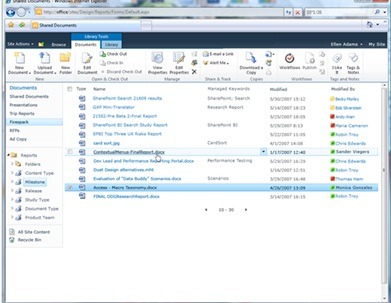
SharePoint 2010 es la nueva versión de herramientas de productividad y colaboración de Microsoft, ahora llamada la plataforma de productividad y colaboración para el negocio que permite interactuar con la información dentro de la empresa y desde la Web.
Este producto ha evolucionado con el tiempo agregando más capacidades, funcionalidad e integración con otras aplicaciones o fuentes de información corporativa, pero SharePoint siempre ha consistido de 2 distintos productos:
SharePoint Services y SharePoint Server.
Ambos productos consisten en software para ser instalado en el servidor, pero tienen distintas características y funcionalidad que ofrecen a los usuarios:
SharePoint Services (por mencionar algunas características),
- Es el que ofrece las funcionalidades básicas de colaboración a las empresas.
- En algunas versiones de sistema operativo de servidores Windows ya viene incluido, en caso contrario basta con descargar el producto de Internet de la página de Microsoft, el costo del producto está incluido en la licencia del sistema operativo del servidor, por lo que no hay que pagar un monto adicional para contar con los beneficios de este producto.
SharePoint Server (por mencionar algunas características),
- Este agrega funcionalidad adicional a la que es ofrecida por SharePoint Services (dependiendo de cada versión por supuesto).
- Este producto si tiene un costo de licenciamiento adicional al del sistema operativo del servidor (para más información favor de consultar algún ejecutivo de cuenta de Microsoft).
- SharePoint Server, requiere de SharePoint Services para funcionar (ya que SharePoint Services es el que ofrece la funcionalidad core o núcleo del producto y SharePoint Server agrega funcionalidad adicional). Entonces si se va a instalar SharePoint por primera vez y se va a instalar SharePoint Server se requiere instalar primeramente SharePoint Services (dependiendo de la versión el instalador ayuda y automatiza esta operación).
Si ya se tiene instalado una implementación de SharePoint con SharePoint Services es posible y existe un mecanismo soportado por Microsoft para hacer la migración a SharePoint Server.
Es importante revisar los prerrequisitos de software dependiendo de la versión que se vaya a instalar.
A continuación una tabla comparativa de las capacidades de la versión anterior, SharePoint 2007, tanto Services como Server (En la versión anterior a SharePoint 2010, SharePoint 2007 ofrecía Windows SharePoint Services 3.0 –así se llamaba la versión de SharePoint Services 2007-, y Office SharePoint Server 2007 –era el nombre de la versión de SharePoint Server 2007- ).
|
Capacidades
|
Windows SharePoint Services 3.0
|
Office SharePoint Server 2007 Edición Estándar
|
Office SharePoint Server 2007 Edición Empresas
|
|
Colaboración
|
X
|
X
|
X
|
|
Portales
|
|
X
|
X
|
|
Enterprise Search
|
|
X
|
X
|
|
Administración de Contenido Empresarial
|
|
X
|
X
|
|
Procesos y Formularios de Negocios
|
|
|
X
|
|
Business Intelligence
|
|
|
X
|
En esta tabla pueden identificar que SharePoint Server 2007 ofrecía dos versiones, Estándar y Enterprise. Para una comparativa a detalle y completa de todas las versiones y capacidades de cada una pueden revisar este archivo de Excel http://download.microsoft.com/download/1/d/c/1dc632e8-71e1-466f-8a2f-c940f1438e0a/SharePointProductsComparison.xls
Entonces ya establecimos que hay dos productos principales de SharePoint, Services y Server. Comentábamos, que éstos con el tiempo y en cada versión nueva, han ido evolucionando, y se van adicionando más funcionalidades y mejores capacidades, a continuación se muestran las distintas versiones de SharePoint:
Si quieres más información sobre las distintas capacidades de SharePoint 2007 y que versión es la adecuada según tus necesidades puedes consultar esta dirección: http://office.microsoft.com/en-us/products/FX101758691033.aspx
Si están interesados en conocer más información acerca de la evolución de cada versión y como Microsoft fue ideando la estrategia de evolución de SharePoint, pueden consultar un artículo muy interesante en el blog del equipo de producto de SharePoint aquí http://blogs.msdn.com/sharepoint/archive/2009/10/05/sharepoint-history.aspx y aquí http://blogs.msdn.com/sharepoint/archive/2009/10/11/engineering-sharepoint.aspx
SharePoint 2010, “The Business Collaboration Platform for the Enterprise and the Web”. La plataforma de negocio para la productividad y colaboración, para la empresa y para la Web.
Por qué el uso de la palabra “Colaboración”: por que engloba distintas actividades que se llevan a cabo día a día como, la creación de contenido, encontrar contenido generado o existente, para poder compartirlo y trabajar eficientemente, analizarlo para tomar decisiones, y finalmente publicar información, documentos e incluso resultados de esas decisiones como indicadores de desempeño inclusive.
Por qué el uso de la palabra “Plataforma”: por que incluye una serie de capacidades mucho más amplias a únicamente poder usar o explotar las funcionalidades básicas que frece por sí el producto, sino que podría verse como una plataforma que permite crear, extender e integrar soluciones de negocio completas que tengan un impacto positivo no únicamente en un departamento o para un requerimiento concreto sino para toda la empresa con distintas necesidades (incluso inter departamental).
Por qué el uso de la palabra “y para la Web”: para indicar que es también posible extender las capacidades que ofrece el producto hacia fuera de la empresa, para interactuar con proveedores, clientes o externos, hacia una estrategia de Cloud Computing con SharePoint Online en caso necesario o requerido.
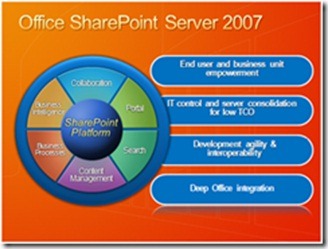
En la versión anterior, SharePoint 2007, se usó un muy conocido diagrama de pie que presentaba de forma generalizada las distintas capacidades del producto.
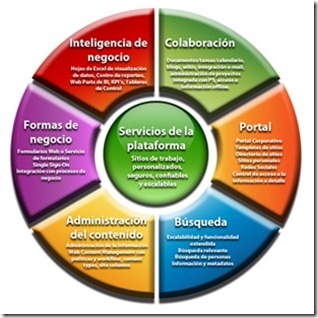
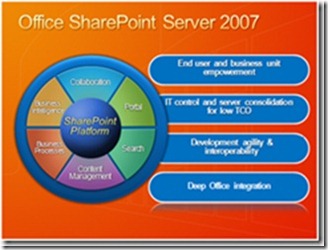
Esta imagen resumía las características más importantes de SharePoint 2007:
- Colaboración,
- Portal,
- Búsqueda,
- Administración del Contenido,
- Formularios de Negocio e
- Inteligencia de Negocio.
Me parece una buena forma para explicar a gran detalle las capacidades del producto.
Ahora para SharePoint 2010, esta imagen ha evolucionado también:
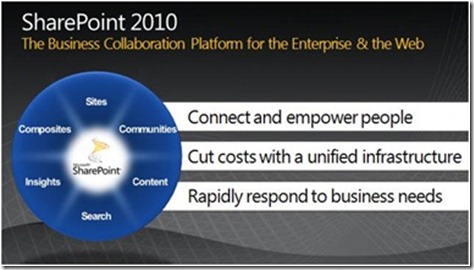
Como ven las categorías o capacidades principales han cambiado con el objetivo de poder representar un agama mayor de posibilidades dentro de las capacidades del producto.
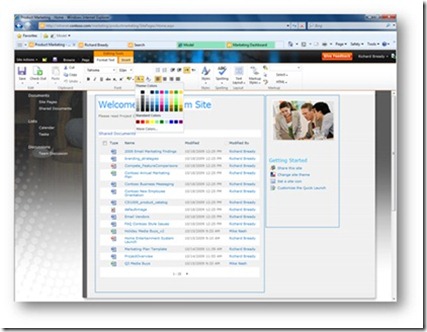
Sites (uso de Sitios)
En 2007, SharePoint entendió sus capacidades para poder ser usado en implementaciones para Intranets, sitios Públicos (Internet) e incluso como Extranet. Para SharePoint 2010, se ha mejorada dicha experiencia e incluso se han agregado capacidades en un amplio rango de dispositivos para acceder al contenido, con distintos navegadores o browsers, por medio de los aplicativos de la suite de Microsoft Office y dispositivos móviles.
1. La Experiencia Web en sitios de SharePoint – La experiencia del usuario ha cambiado al entrar a un sitio de SharePoint 2010, la incorporación del “Ribbon” así como en la suite de Microsoft Office 2010, lo hace familiar y simple de usar. La incorporación de tecnologías como AJAX permite responder a la página más rápido según las peticiones de los usuarios. Mejoras en el uso multilenguaje incluyendo WCAG 2.0 y soporte entre navegadores construidos con compatibilidad XHTML.
2. Integración con clientes de Office – Se continúa dando soporte a versiones anteriores de Microsoft Office con SharePoint 2010. Office 2010 mejora la experiencia del usuario con capacidades como el trabajo y edición asíncrona fuera de línea u Offline. De igual forma es interesante la integración que se logra con el Backstage de Office 2010 y nuevas formas para guardar y compartir la información con la suite de productos de Office 2010.
3. SharePoint Workspace – En esta nueva versión la integración con el antes llamado “Groove” ahora formalmente SharePoint Workspace 2010 permite mayores ventajas en la integración con sitios de SharePoint 2010, permitiendo usarlo como cliente Offline sincronizado a sitios de SP 2010.
4. Las Aplicaciones Web de Office <Office Web Apps> – Una nueva característica que está disponible para algunas de las aplicaciones de Office 2010, que permite leer y editar contenido directamente desde el navegador. Las Aplicaciones Web de Office incluyen Word, Excel, PowerPoint, y OneNote y les permiten a los usuarios trabajar con contenido almacenado en dichos aplicativos desde un browser. Esto permite instalar las Aplicaciones Web de Office en SharePoint 2010 para contar con dicha experiencia. Por otro lado, se mantienen los servicios de InfoPath y Excel, para que los usuarios trabajen con formularios creados con Microsoft Office InfoPath directamente en el navegador (previa publicación de los formularios a SharePoint) así como Excel Services para poder consultar información de archivos y hojas de Excel usando únicamente el navegador con la nueva modalidad de poder editar también el contenido de estas hojas de Excel directamente en el navegador y con una experiencia muy similar a la que un usuario obtiene al trabajar con el cliente de Excel. Por último, nuevas versiones de Office para trabajo en Web como Visio y Access han sido incorporadas en esta versión 2010. Existen videos muy interesantes en Channel9 de Microsoft que muestran el potencial de estos nuevos servicios.
5. Acceso a contenido de SharePoint Móvil <SharePoint Mobile Access> – Una nueva modalidad del trabajo fuera de línea u Offline se podrá hacer aparte del uso de SharePoint Workspace 2010 y el ya conocido Microsoft Outlook, ahora mejorado en la versión 2010, es con un Nuevo cliente de Windows Mobile. Estos clientes permiten navegar entre listas y librerías de documentos, hacer búsquedas de información y de personas e incluso ver y editar documentos de Office con la experiencia de las aplicaciones Web de Office desde un navegador en un dispositivo móvil.
Communities (uso de Comunidades)
En SharePoint 2010 vienen incorporadas funcionalidades de Web 2.0, tagging, like-it, e incluso capacidades de redes sociales como lo introdujo SharePoint 2007 con el uso de los sitios personales (o My Sites) para poder crear relaciones o lazos de conocidos e intereses similares en la empresa algo parecido a lo que fuese un Hi6 o Facebook para la empresa. Algunas de estas capacidades:
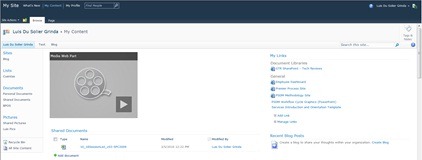
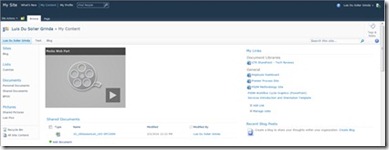
1. Colaboración en trabajo con contenido – Mejorada la experiencia de uso en trabajo dentro de sitios de SharePoint 2010, mejorada la experiencia de uso de Blogs y Wikis, y se incorporan nuevas capacidades para compartir, y publicar otros tipos de contenido como video embedidos por ejemplo, siendo que antes se tenía que incorporar código mediante script, ahora se cuenta con un WebPart de Silverlight e incluso uno para mostrar video (local o de Internet). Con el uso de Office 2010 varias personas pueden estar trabajando y colaborando en contenido almacenado en SharePoint 2010.
2. Retroalimentación Social y de la Organización – Con SharePoint 2010, es posible compartir opiniones sobre el tipo de contenido con el que los usuarios trabajan, por ejemplo, que es más importante para ti o prioritario, así como si te parece interesante o no completamente de tu agrado, incluso hacer recomendaciones del contenido o de la información a otros compañeros. Se introduje el concepto al ambiente de trabajo de “Social Tagging” con el uso de taxonomías definidas a nivel corporativo o taxonomías definidas o declaradas de manera informal o en pequeños grupos como folksonomía –no necesariamente como estándar corporativo-.
3. Manejo de Perfiles de Usuarios – Se ha mejorado las capacidades ofrecidas por los perfiles de usuarios en la versión 2007, reflejando colegas, compañeros, interesados, experiencias, ya sea por asignación explícita “tagging” o incluso por recomendaciones de otros usuarios basadas en Outlook y Office Comunicator. Los usuarios pueden definir qué información es pública y se comparte y cual es privada, cuál estará disponible para un grupo de personas que cumplan con un cierto “perfil” y cuáles no.
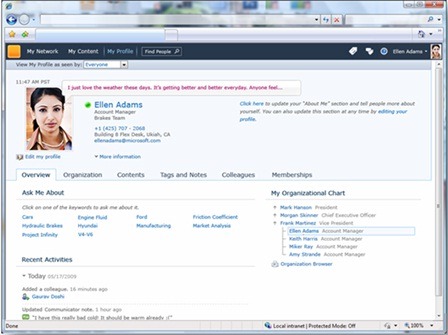
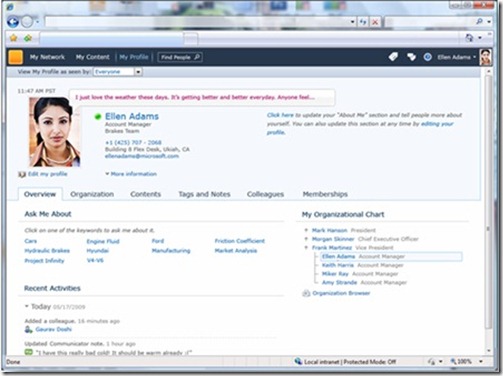
4. Mi Sitio <My Sites> – Se ha mejorado la experiencia en los sitios personales. Los usuarios pueden compartir su status actual, similar a MSN o Facebook, ver lo que sus colegas están hacienda o compartiendo, incluso viene un Nuevo organigrama desarrollado con Silverlight integrado a los sitios personales. Se incorpora la visualización de tags para ver que ha indicado como interesante o relevante el usuario. Los usuarios pueden actualizar información de su perfil por este medio., y compartir información con otros usuarios dependiendo de su perfil y características.
5. Conexión y comunicación entre personas – En SharePoint 2003 existía un link que siempre estaba disponible para que el usuario entrara a su sitio personal, independientemente de donde se encontrara, y poder interactuar con compañeros, vía correo electrónico, mensajería instantánea e incluso llamada telefónica si tuviera integración con Comunicaciones Unificadas. En 2010, se ha mejorado la interfaz gráfica que ofrece nuevas opciones para interactuar con las personas, a través de Outlook y Office Communicator mediante presencia online, seguimiento de personas (tracking) y búsqueda dependiendo de varias características como experiencia, preferencia, intereses etc. Ahora se incluye también una sección donde se puede mostrar un diagrama organizacional en Silverlight, bastante cool!
Content (Administración y manejo del contenido)
SharePoint 2007 ofrecía capacidades de administración de documentos, manejo de histórico y registros de información (por ejemplo para control o almacenamiento de contratos legales, etc.), y por su puesto el manejo y administración de contenido Web para su fácil administración y sencilla publicación, mejorías a la plataforma para manejo de metadata, seguridad y flujos.
SharePoint 2010 agrega aún más capacidades de manejo y administración de contenido corporativo, por mencionar algunas:
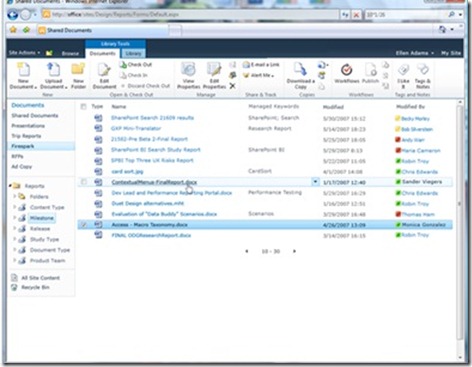
1. Manejo de listas y librerías que almacenan mucho contenido – Se hicieron mejoras en la arquitectura de la nueva versión para que los usuarios pudieran trabajar con listas con un número mucho mayor de ítems o elementos, del recomendado en la versión anterior. Las listas de información ahora escalan a decenas de millones de elementos y a cientos de miles de documentos. De igual forma se hicieron mejoras en la forma como SharePoint Designer interactúa con gran número de elementos dentro de las listas respecto a flujos de trabajo.
2. Manejo de Metadatos– Se han hecho mejoras para extender el uso de tipos de contenido <content types> y taxonomías no solo a nivel de sitio sino entre sitios incluso la capacidad de poder interactuar con estas capacidades de información no solo desde SharePoint sino desde los clientes de Office también. Para mejorar la búsqueda se han aplicado mejoras a la forma de asociar taxonomía y asignaciones de contenido social <social tagging> o <folksonomy> relacionadas al contenido de los usuarios.
3. Set o Conjunto de Documentos – Ahora será posible no solo interactuar o trabajar con un documento dentro de un flujo sino con un conjunto de documentos manejado como un “set de documento” dependiendo de sus características o metadatos relacionados (por ejemplo: una propuesta, una presentación, un presupuesto, un contrato, etc.).
4. Publicación de contenido Web – Se han hecho muchas mejoras en la forma en la cual los usuarios trabajan con su información en las páginas web de un sitio de SharePoint, la configuración de las distintas secciones de la página así como su personalización es mucho más rápida y sencilla de hacer sin estar navegando entre distintas pantallas de configuración para cada Web Part. Se han agregado mecanismos para interactuar con distintos tipos de información no solo documentos, sino, poder asignar ratings a imágenes, manejo de videos, interactuar con gráficas de Excel por ejemplo solo mostrando la gráfica de Excel directamente en la página como si fuera una imagen pero dinámica si estuviera relacionada con datos de las hojas de Excel, se actualiza al volver a cargar la página.
5. Administración del contenido y de la información <Governance y Records Management> – Se han mejorado las opciones disponibles de los usuarios como sugerencias y mecanismos automatizados para implementar las mejoras prácticas de administración de la información y de cómo se guarda este en el sistema documental de SharePoint.
Search (Búsqueda de información y personas)
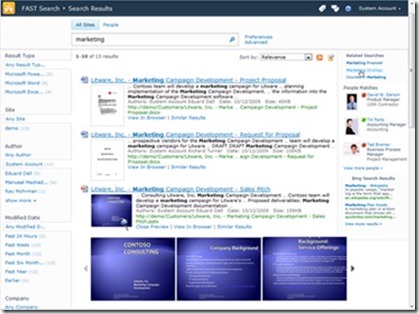
El proporcionar mecanismos eficientes de búsqueda ha sido una gran inversión de Microsoft, desde Search Server Express, en SharePoint Standard y hasta el nuevo FAST Search for SharePoint. Con el tiempo se han agregado nuevas capacidades de búsqueda no solo de información sino también de personas y con esta nueva versión de otro tipo de propiedades del contenido relacionado por los mismos usuarios, según su importancia, y preferencia.
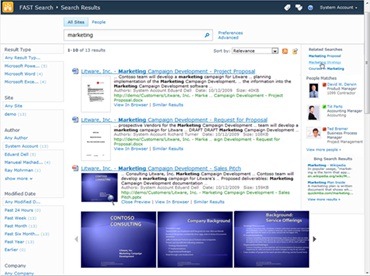
1. Experiencia más interactiva de búsqueda – Se ha mejorado la experiencia de búsqueda para los usuarios, mejorando la navegación y filtros en los resultados de búsqueda, así como refinación y sugerencias en los mismos. Tanto la versión Estándar cómo FAST Search for SharePoint ofrece sugerencias y auto-complete, verificación de ortografía, y formulas en los query’s de búsqueda, una interesante mejoría en los resultados es el preview de contenido en presentaciones de Power Point resultantes de las búsquedas.
2. Relevancia – Se incorporaron mejoras en la funcionalidad default del producto (sin necesidad de comprar add-in adicionales) en el rankeo y manejo de relevancia según quien está buscando información y obtiene resultados del mismo, esto genera valor en las búsquedas relacionadas entre gentes con intereses similares relacionados en una red social.
3. Búsqueda de Personas – Se ha mejorado la experiencia en la búsqueda de personas basada en el comportamiento de los usuarios y su relación con otras personas en las redes sociales establecidas por el usuario por medio de SharePoint, con base en algoritmos de relación y experiencias
4. Conectividad – Es una realidad que mucha de la información en las empresas está almacenada fuera de SharePoint, y para que los usuarios tengan acceso a ella se han mejorado los conectores para indexar contenido en sitios web, file servers, Exchange, información de otras granjas de SharePoint, Lotus Notes, Documentum e incluso FileNet, para que desde SharePoint los usuarios puedan acceder a esta información y trabajar con ella. Las mejoras que se le han hecho al Business Data Catalog (BDC) o Catálogo de Datos Profesionales o de Negocios, permite tener una mucha mayor interacción con la información contenida en otros repositorios de información externos a SharePoint, y ahora no únicamente lectura sino escritura desde SharePoint a esas fuentes externas. La configuración de esta funcionalidad se ha simplificado enormemente siendo que antes se tenía que configurar un archivo XML e importarlo a la granja de SharePoint para que este entendiera la estructura de las bases de datos externas, esto tenía que ser configurado por un administrador de la granja generalmente. El BDC ha evolucionado a lo que ahora se llama Business Connectivity Services (BDC), ahora es posible configurarlo sin mucho código y mediante el uso de la nueva versión de SharePoint Designer 2010.
5. Flexibilidad y extensión de la plataforma – Se hicieron importantes mejoras en el performance y la escalabilidad de la plataforma, y se puede ver en la tecnología de búsqueda. Disponible únicamente para 64 bits, SharePoint 2010 ofrece mejoras a la vista en la velocidad de respuesta al interactuar con el contenido en los sitios y al obtener resultados de búsqueda también. Es ha mejorado uso de mayor cantidad de contenido en listas y biblioteca de SharePoint, superando cientos de millones de documentos con buena experiencia en el resultado de búsquedas a este contenido.
Insights
Históricamente, el BI (Business Intelligence o la Inteligencia de Negocios) se ha implementado en las empresas primordialmente por un pequeño grupo de personas con herramientas muy especializadas o sofisticadas que se dedican a hacer el BI de la organización. La idea que pretende ofrecer Microsoft para SharePoint 2010 es habilitar a los Information Workers o a las personas que trabajan con la información, para que ellos mismos cuenten también con capacidades para poder explotar su información y generar Inteligencia de Negocio sin tener que depender tanto de las decisiones o prioridades que tome este pequeño grupo de BI de acuerdo a las prioridades de reporteo de la organización. Entonces la idea es poder ofrecer de opciones y herramientas incluidas en el producto que les habilite a los IW a poder generar valor de sus datos y de la información almacenada de una forma más sencilla, por medio de ciertas capacidades, algunas ya conocidas pero mejoras como por ejemplo Excel Services o los Servicios Web de Excel. Excel Services ha sido usado desde la versión anterior para poder compartir información de estadísticas, gráficos, resultados, modelados o incluso proyecciones financieras entre los grupos de trabajo en SharePoint usando solo el navegador, sin necesidad de tener instalado el cliente de Microsoft Office Excel de tal forma que todo el equipo de trabajo identifique y pueda acceder a la última versión del documento y mantener control del mismo.
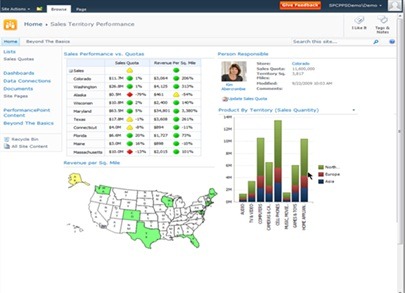
1. Servicios de Excel <Excel Services> – Los Servicios de Excel siguen ofreciendo opciones para poder compartir y publicar información de un archive de Excel en el navegador, con filtros, búsqueda, gráficas, etc. Hay más opciones interesantes en esta versión para 2010, como la posibilidad de editar directamente en el navegador por ejemplo archivos estáticos no nada más de lectura y la posibilidad de interactuar o mostrar gráficas como imágenes directamente en el sitio y que se puedan ir viendo los cambios reflejados en esas gráficas relacionados a los datos del mismo archivo, sin tener que abrir o entrar al detalle del archivo de Excel en el navegador o en el cliente.
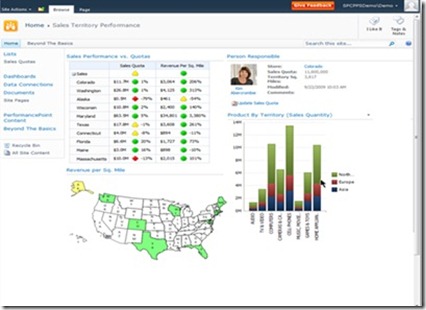
2. Performance Point Services – En SharePoint 2010 viene incluido como servicio el core de Performance Point que permite extender la funcionalidad de las ya conocidas KPI (Key Performance Indicators o Indicadores de Performance) lists de la versión anterior., para presentar tableros de control o scorecards, dashboards, y mejores opciones de navegación en estos tableros de información.
3. SQL Server – Los equipos de producto de SharePoint y de SQL Server han estado trabajando en conjunto para que las capacidades de Analysis Services y Reporting Services estén de una forma más sencilla accesibles para su uso a través de SharePoint y Excel. Microsoft está trabajando con estas nuevas interfaces para que partners y otras empresas socias puedan usar estos beneficios.
4. “Gemini” – “Gemini” es el nombre de una nueva tecnología que permite mediante el uso de Excel y Excel Services, trabajar y visualizar una gran cantidad de información sin tener que implementar cubos OLAP. Imagina una hoja de Excel mostrando ya sea en el cliente de Excel o en el navegador, 100 millones de registros sin problema alguno de lentitud o performance. El nombre Oficial de Gemini es: SQL Server Power Pivot for Excel and SharePoint.
5. Servicios de Visio <Visio Services> – Así como con Excel, los usuarios están muy interesados en poder generar gráficas ricas en contenido y diagramas en Visio. En 2010 se ha mejorado la experiencia de carga o presentación de contenido Web con interactividad de parte del usuario, y conexiones con otras fuentes de información por ejemplo el uso de mashups con SharePoint, proveyendo de visibilidad de diagramas y gráficas a través de diagramas de Visio usando el navegador. Una adición a 2010 es el soporte a la generación y diseño de Flujos de SharePoint dentro de Visio.
Composites
Una de las mayores áreas de inversión para mejorar SharePoint 2007 fue el hacer las cosas más sencillas para todos, llámese usuarios finales, personal de TI Administrativo, partners o socios de negocio, etc. Con el objetivo de construir soluciones personalizadas dependiendo de las necesidades de cada rol para automatizar los procesos de negocio y comunicación entre estos. La idea de estas mini-soluciones conformadas por una combinación de distintos servicios ofrecidos por la plataforma y que permitan a los distintos usuarios de una manera más sencilla sin requerir todo un equipo de especialistas para poder construir soluciones que agreguen valor al día a día de los distintos procesos de las organizaciones o empresas.
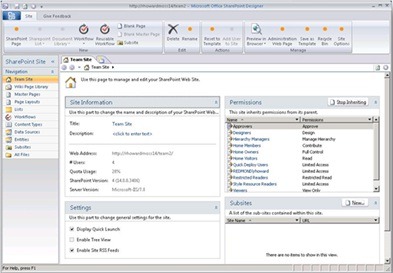
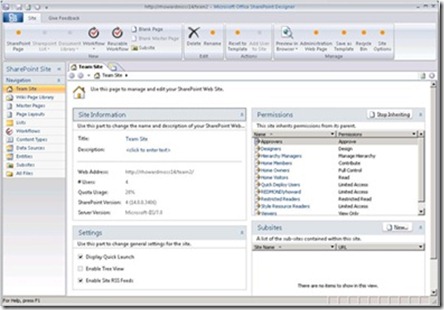
1. SharePoint Designer – SharePoint Designer 2010 se ha mejorado y se han agregado nuevas funcionalidades que permiten a los usuarios interactuar con los nuevos y mejorados servicios de la plataforma, por ejemplo la configuración de listas externas para interactuar con información almacenada en fuentes de datos externas por medio de BCS (Business Connectivity Services).
2. Servicios de Formularios de InfoPath <InfoPath Forms Service> – InfoPath ahora como la mejor opción de presentar un formulario web para presentar datos o capturar información. Se han incluido mejoras en los servicios de InfoPath para que sea más nativa la forma en cómo se incorporan estos formularios dentro de una página web como parte de la misma y no en una hoja completa aparte.
3. Servicios de Access <Access Services> – Los usuarios hace ya tiempo han usado bases de Access para poder concentrar y almacenar información de manera sencilla y eficiente manejando formas y vistas para capturar y visualizar la información. Los Servicios de Access les permitirán a los usuarios publicar bases de datos guardadas en Access 2010 como soluciones automatizadas para interactuar con la información que se tenía en dichas bases pero ahora través de sitios web de SharePoint, esto le permite a los usuarios acceder vía Web a su (anteriormente aislada) base de datos mediante un punto céntrico y sustentado por una plataforma robusta considerando su ciclo de respaldos e incluso dentro de un plan de DRP definido por la parte de TI de la organización (considerando a SharePoint como la plataforma a respaldar y la base de Access publicada contenida en esta). Hay videos demos de este nuevo servicio en Channel9.microsoft.com que valen la pena ser vistos.
4. Sandbox Solutions – En SharePoint 2007, el código desarrollado requiere de permisos aplicados para tener ciertos privilegios de ejecución. En SharePoint 2010 se introduce un nuevo concepto para el desarrollo e incorporación de código en SharePoint, que permite aislar su ejecución y uso de recursos (memoria, CPU) sin impactar en performance o customizaciones para otros sitios de la granja, un gran aditamento sin duda para los desarrolladores.
5. Business Connectivity Services – La nueva versión de Business Data Catalog (BDC) o catálogo de datos profesionales o de negocios ha sido mejorada, ahora no solo permite lectura de datos externos sino también interacción en la modificación (crear, editar, actualizar y eliminar registros). El mostrar en la nueva versión la información mediante BDC a través de una lista de SharePoint se llama ahora listas externas o external lists en SharePoint 2010 y es mapeada a un tipo de dato de contenido o content type externo (external content type), de tal modo que pueda comportarse como si fuera información de una lista normal en SharePoint. Es posible no solo editar la información mediante el uso de la lista externa de SharePoint sino incluso trabajando fuera de línea sincronizando para trabajo offline con SharePoint Workspace, e incluso con Outlook en algún escenario para trabajar con contactos. La integración de BCS a través de SharePoint Designer y Visual Studio 2010 ofrece una gran gama de interacción para usuarios finales y desarrolladores por igual.
SharePoint 2010, agrega muchas otras nuevas ventajas, tanto en la Administración, como en el desarrollo.
Por mencionar algunas:
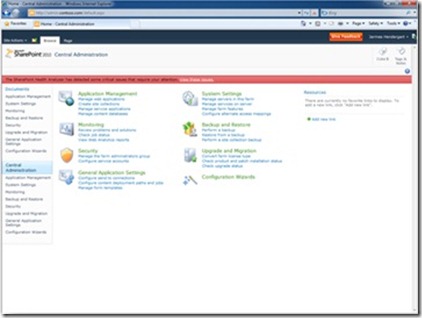
Respecto a la administración: Mejoras en el proceso de migración de versiones anteriores (Visual Upgrade), una versión mejorada del preupgradechecker, herramienta que viene con la línea de comando para validar que esté todo listo para comenzar la migración. Este reporteador de estatus puede ser ejecutado las veces necesarias y genera un reporte html que nos permite visualizar de una manera mucho más entendible como se encuentra nuestra granja, recomiendo también descargar de Codeplex la herramienta de SPFARMReports. Recuerden que SharePoint 2010 solo está disponible en arquitecturas de 64 bits. Incorpora una sección de análisis y monitoreo de salud de la granja que le ayudará a los administradores a identificar puntos clave de mejoras para un mejor funcionamiento de la granja. Cabe mencionar también la mejora de scripting para administrar nuestras granjas de SharePoint 2010 ahora con Powershell, ya no se usará stsadm aunque vienen algunas opciones para empezar a despedirnos de él. Algo muy importante es que la arquitectura previa del Proveedor de Servicios Compartidos (en Inglés: Shared Services Provider -SSP-) ya no está más presente en SharePoint 2010, ahora es más escalable la arquitectura de la misma siendo que podemos agrupar una Web Application a los servicios que nosotros deseemos, los cuales eran antes administrador a través del SSP, ahora con un proxy podemos agrupar una serie de dichos servicios y relacionarlos a la o las Aplicaciones Web que requiramos. El modelo de Actualizaciones de Software (Software Updates) ha mejorado considerablemente así como la historia que teníamos para el manejo de redundancia, incluso a nivel base de datos no solo a nivel granja.
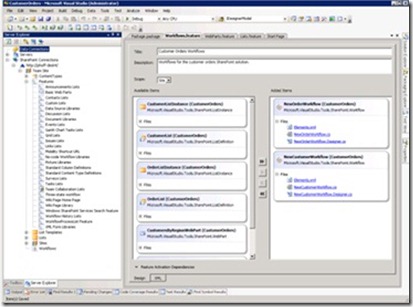
Respecto al desarrollo: También tenemos muchas mejoras para los desarrolladores, como nuevas APIS disponibles para SharePoint 2010, uso de REST, ATOM, JSON y LINQ, mejoras en el desarrollo y vida de las aplicaciones y proyectos en Visual Studio 2010, con manejo de soluciones, soporte para Visual Studio 2010 por su puesto (deployment y debugging con F5, integración con el Explorador de objetos VS) y opciones para migrar código usando las Visual Studio Extensions para VSS (VSEforWSS) ahora apara la nueva versión.
Una adición muy interesante es el Developer Dashboard, que puede ser activado o desactivado y le permite a los desarrolladores identificar donde está la mayor carga de trabajo en llamadas al servidor, store procedures o procedimientos almacenados, e incluso por que se tardó el tiempo que se tardó la página en mostrarse en el navegador dependiendo de todo lo que cargue.
Por último algo también solicitado por los developers la posibilidad de desarrollar para SharePoint 2010, desde Windows 7 sin la necesidad de tener que levantar un ambiente de desarrollo (no en producción) usando Windows Server.
Bien, una vez habiendo hablado de las diversas ventajas que ofrece SharePoint 2010, podríamos hablar de dos temas importantes:
- Podría ser que la empresa aún tiene SharePoint 2007, y mientras se planea la implementación de SharePoint 2010 en el mediano plazo, hay interés de seguir explotando la versión anterior. Para ellos tenemos un excelente Web Cast de un muy buen amigo y especialista en SharePoint, Haaron González MVP. En el video que a continuación la comunidad pone a sus disposición nos comparte algunas ideas de cómo es posible seguir explotando los beneficios que SharePoint ofrece se los recomiendo. Para ver el WebCast favor de hacer Click Aquí
- Por otro lado, como hemos comentado en el artículo, SharePoint 2010 es únicamente compatible para una arquitectura de 64 bits, no para 32 bits, por lo tanto, si estamos ya planeando en migrar a SharePoint 2010, independientemente de que mecanismo de migración o actualización usemos, si tenemos SharePoint 2007 y queremos migrar a SharePoint 2010 algo importante es empezar a pensar en la arquitectura de 64 bits, y ver de qué forma migrar el ambiente de SharePoint 2007 a una arquitectura de 64 bits (a una nueva granja de 64 bits si es que la actual está en una arquitectura de 32 bits) por medio del movimiento de las bases de datos de contenido, o moviendo la granja que tengamos de SharePoint 2007 (si es que actualmente está en una arquitectura de 32 bits) a una arquitectura o hardware que soporte 64 bits. Para ello a continuación comparto también un excelente Web Cast de un muy buen amigo y especialista de SharePoint, Vladimir Medina MVP. Para ver el WebCast favor de hacer Click Aquí
Fuente, para mayor información: SharePoint 2010.