Hola a todos, Retomando el blog, ya que lo tenia descuidado. :).
Definitivamente hay cosas que parecen sencillas, pero que a la hora de la verdad es todo lo contrario o no parecían simples. Este es el caso de usar el control AutoCompleteExtender de la librería ASP.NET AJAX Control Toolkit enlazado a una base de datos, pero que muestre mas de una columna y al momento de seleccionar solo quede el campo que queremos.
Bueno ya todos saben donde descargar la librería, como hacer la referencia al ensamblado. sin embargo en la url a continuación es un lugar para empezar.
http://www.codeplex.com/Wiki/View.aspx?ProjectName=AjaxControlToolkit
- Servicio web, con el cual consultamos la bd y hacemos la búsqueda.
Nota: hay varias formas de hacerlo y la tecnología lo permite.
1: [WebMethod]
2: public string[] GetProducts(string prefixText, int count)
3: {
4: List<string> items = new List<string>(count);
5: DataSet ds = new DataSet();
6:
7:
8: string connectionString = "Data Source=localhost;Persist Security Info=True;Integrated Security=SSPI;Initial Catalog=AdventureWorksLT;";
9: using (SqlConnection connection = new SqlConnection(connectionString))
10: {
11: string sql = "SELECT * FROM SalesLT.Product WHERE Color LIKE '" + prefixText + "%'";
12: SqlDataAdapter adapter = new SqlDataAdapter();
13: adapter.SelectCommand = new SqlCommand(sql, connection);
14: adapter.Fill(ds);
15: }
16:
17: foreach (DataRow dr in ds.Tables[0].Rows)
18: {
19: items.Add(dr["Name"].ToString() + "|" + dr["Color"].ToString() + "|");
20: //items.SetValue(dr["TAR_Codigo"].ToString() + "t" + dr["TAR_Tipo"].ToString());
21:
22: }
23:
24: return items.ToArray();
25: }
2. Ahora la .aspx
1: <asp:TextBox ID="txtProducts" runat="server" Height="21px" Width="334px"></asp:TextBox>
2:
3: <cc1:AutoCompleteExtender runat="server"
4: BehaviorID="AutoCompleteEx"
5: ID="e_Products" TargetControlID="txtProducts" ServicePath="AutoCompleteRows.asmx" OnClientPopulated="selectItem"
6: ServiceMethod="GetProducts" MinimumPrefixLength="2" CompletionInterval="1000"
7: EnableCaching="true" CompletionSetCount="8"
8: CompletionListCssClass="autocomplete_completionListElement"
9: CompletionListItemCssClass="autocomplete_listItem"
10: CompletionListHighlightedItemCssClass="autocomplete_highlightedListItem">
11: <Animations>
12: <OnShow>
13: <Sequence>
14: <%1: -- Make the completion list transparent and then show it --%>
15: <OpacityAction Opacity="0" />16: <HideAction Visible="true" />17:18: <%1: --Cache the original size of the completion list the first time2: the animation is played and then set it to zero --%>
19:20: <ScriptAction Script=" />21: // Cache the size and setup the initial size22: var behavior = $find('AutoCompleteEx');23: if (!behavior._height) {24: var target = behavior.get_completionList();25: behavior._height = target.offsetHeight - 2;26: target.style.height = '0px';27: }"28:29: <%1: -- Expand from 0px to the appropriate size while fading in --%>
30:31: <Parallel Duration=".4">32: <FadeIn />33: <Length PropertyKey="height" StartValue="0" EndValueScript="$find('AutoCompleteEx')._height" />34: </Parallel>35: </Sequence>36: </OnShow>37: <OnHide>38: <%1: -- Collapse down to 0px and fade out --%>
39:40: <Parallel Duration=".4">41: <FadeOut />42: <Length PropertyKey="height" StartValueScript="$find('AutoCompleteEx')._height" EndValue="0" />43: </Parallel>44: </OnHide>45: </Animations>46: </cc1:AutoCompleteExtender>
3. Un poco de javascript para que solo seleccione el campo que queremos.
1: <script type="text/javascript">
2: function selectItem() {
3: var comletionList = $find("AutoCompleteEx").get_completionList();
4: for (i = 0; i < comletionList.childNodes.length; i++) {
5: var _value = comletionList.childNodes[i]._value;
6: comletionList.childNodes[i]._value = _value.substring(_value.lastIndexOf('|') + 1);
7: _value = _value.substring(0, _value.lastIndexOf('|'));
8: comletionList.childNodes[i].innerHTML = _value.replace('|', '<br/>');
9: }
10: }
4. Algunas imagenes
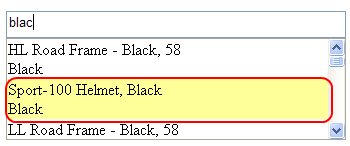

Nota: La función java script es sacada de un foro, y mejorada para mis necesidades. :).
Espero sea de su agrado.
Romny

string sql = «SELECT * FROM SalesLT.Product WHERE Color LIKE ‘» + prefixText + «%'»;
Cuidadin con el SQL Injection 😉
Saludos
Como ya dije, hay muchas formas de hacer la busqueda, solo es un ejemplo para ver el uso del control. Aunque si, estoy de acuerdo.
DEBERIAS PONER EL CODIGO DEMO
hola…
justo en este momento me encuentro trabajando con autocomplete, el problema que tengo es que que jamas accedo al .cs, bueno he puesto ServicePath y ServiceMethod, tambien intenté con:
… pero aún asi nada… bueno, si tu puedes enviarme el codigo de ejemplo, me sería de gran utilidad.. gracias..
jgaete@tecniva.cl
Hola la verdad el servicio web funciona bien si lo ejecuto directamente hace lo que tiene que hacer, pero cuando se ejecuta desde una pagina con el textbox y el extender no hace nada de nada. Tengo el codigo exacto que se posteo arriba. Gracias.
hola
primero que todo quiero comentarte que soy nuevo en ajax control toolkit la verdad es q me gustaría conocer mas sobre estos controles en especial autocompleteextender. me parece muy interesante este ejemplo q tu has desarrollado ya que utilizas una base de datos…
sera posible q puedas publicar el código para descargarlo
estaría muy agradecido..
o si me lo puedes enviar a mi e-mail
andresinhopower@hotmail.com
GRACIAS
Buenas a todos. Todos conocen el AutoCompleteExtender de la librería ASP.NET AJAX Control Toolkit y te